Do you want to change the signature image in Outlook 2016 to make your emails look professional, elegant and smart? With more and more options in MS Office and outlook, sometimes we just need a few hints along the way. To make sure your signature image in outlook 2016 is perfect then just follow these very simple instructions.
Instructions to resize a Signature Image in Outlook 2016
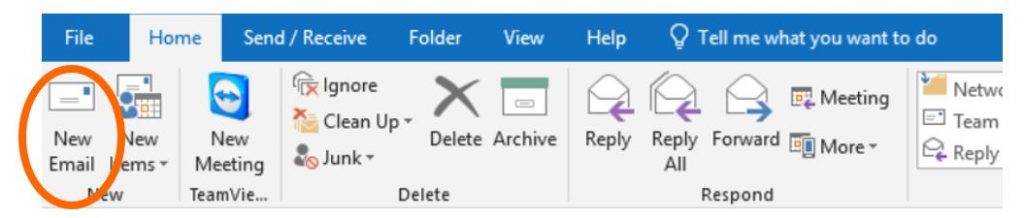
Open outlook as you would ordinarily do select the option to create an email as you would typically do.
A new email window will then appear.
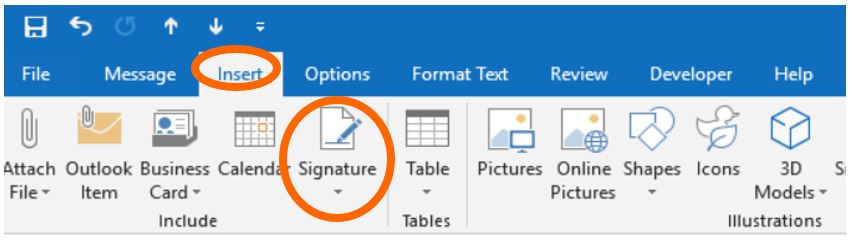
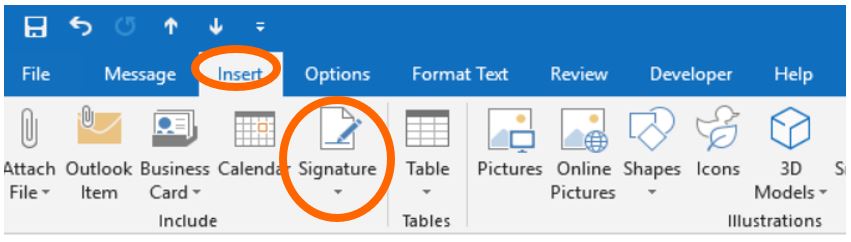
Select the option Insert and then Signature.
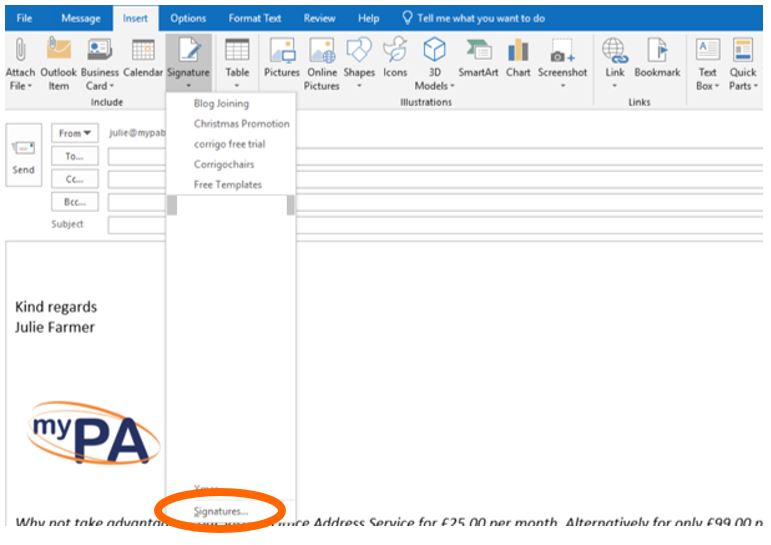
A list of all the current signatures installed on your computer will appear. At the very bottom is the word Signature. Select this option, see below.
A new window will appear.
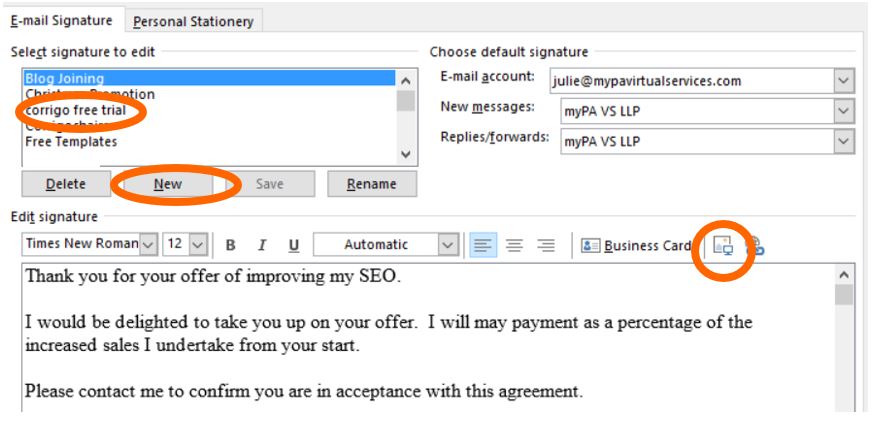
Select the email signature you want to edit, if you have not created an email signature select the option New, see above, in this example I will collect Corrigo free trial. Enter the narrative you wish to have on the signature in the box provided. Then add your image by selecting add picture icon, see above. This will then require you to find the location of the image on your computer or server.
Once the image has been selected, it will appear in the dialogue box. See below.
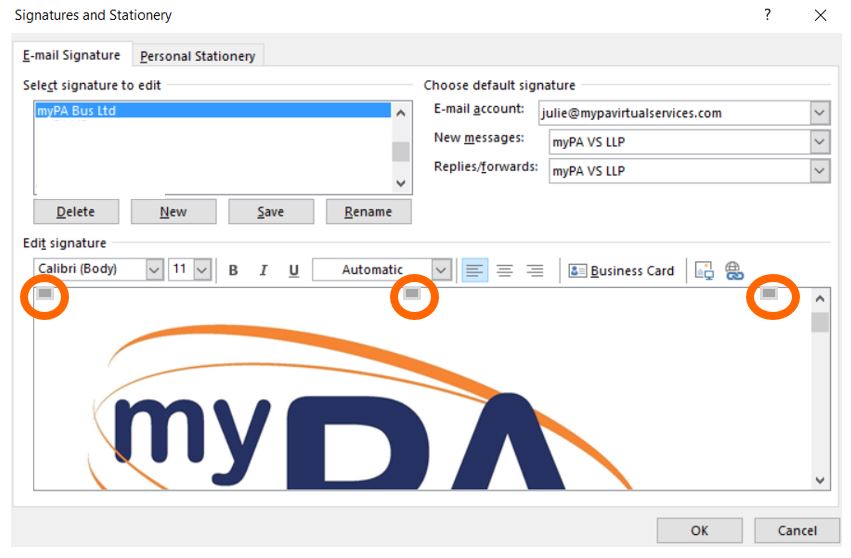
Using your mouse, click ONCE on the image. You will notice little squares appearing on the image, see below.
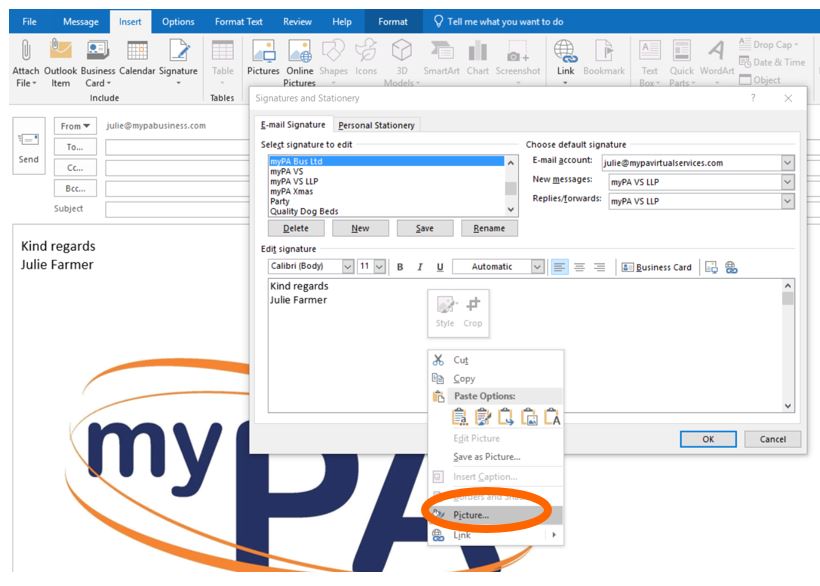
Once these little squares appear, press the right-hand button on your mouse and click once only.
A new screen will appear. Select the option Picture, see below.
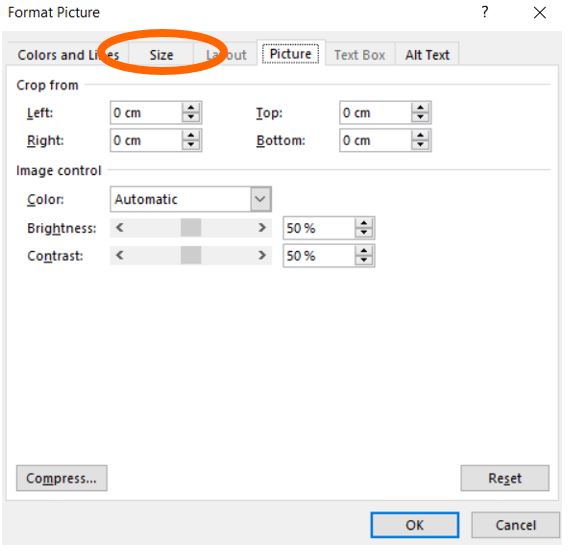
This will open another window, see below. On this window select the option Size, see below.
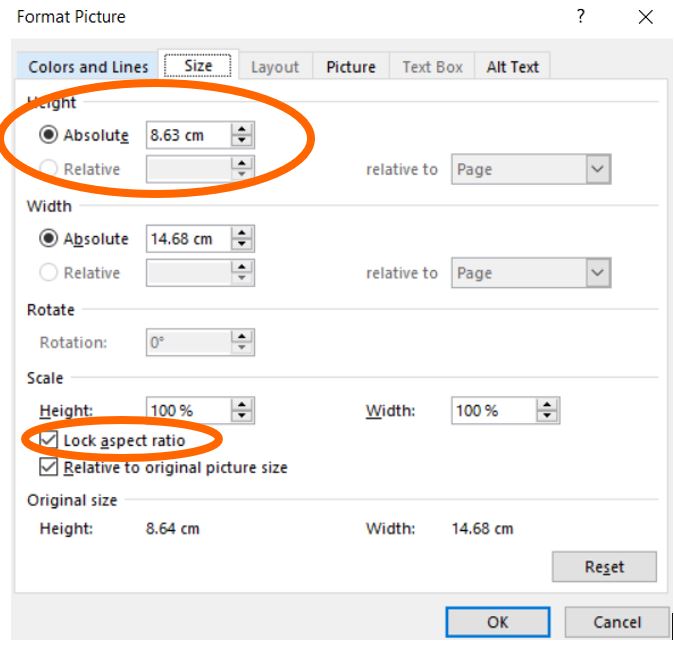
The following screen will appear. It is from here that you can now resize your image. Please make sure that the Lock aspect ratio option is selected. If you have decided that 7.63 cm would be perfect, enter 7.63 in the Height option and press the enter button only. This will automatically adjust the Width.
Once the image is of the right size, please copy this narrative and place it under the image. Then select OK.
Small Claims for Personal Assistants: What Every PA Should Know
As a PA or EA, you’re often the one expected to deal with the messy jobs no one else wants. Chasing late payments is one of them. A director might casually tell you, “Can you sort this out? They owe us £2,000.” Suddenly, you’re the one left untangling contracts, sending reminders, and figuring out whether the company should take legal action.
This is where understanding the small claims process becomes another tool in your professional toolkit. You may never need to issue a claim yourself, but knowing how it works shows you can protect your organisation’s interests and your boss’s time.
Why PAs and EAs Need This Knowledge
Part of supporting senior executives is being resourceful. It’s not just about diary management and travel booking—it’s about being the person who can say, “Yes, I know how that works, leave it with me.”
Small claims knowledge is particularly valuable when you’re:
Following up on unpaid invoices for your executive’s consultancy or side business
Supporting the finance team with administration
Helping to recover deposits, payments, or contracts gone wrong
Demonstrating that you understand the commercial risks your company faces
It’s one more way you can show initiative, problem-solving ability, and commercial awareness—all skills that make a PA indispensable.
Costs to Be Aware Of
Here’s the updated fee structure (July 2025) that you need to know if you ever have to brief your boss or prepare paperwork:
Issue fees for starting a claim:
Up to £300: £35
£300.01 to £500: £50
£500.01 to £1,000: £70
£1,000.01 to £1,500: £80
£1,500.01 to £3,000: £115
£3,000.01 to £5,000: £205
£5,000.01 to £10,000: £455
£10,000.01 to £200,000: 5% of the claim
Over £200,000: £10,000
Hearing fees if it goes to court:
Up to £300: £27
£300.01 to £500: £59
£500.01 to £1,000: £85
£1,000.01 to £1,500: £123
£1,500.01 to £3,000: £181
Over £3,000: £346
As a PA, being able to explain these numbers quickly and clearly to your boss is precisely the kind of detail that sets you apart.
Interest and Compensation
Another question your executive may ask is: “Can we add interest?”
The answer is yes. If there isn’t already a contract clause, statutory interest applies at 8% plus the Bank of England base rate. For business debts, you can also add compensation:
Under £1,000: £40
£1,000–£10,000: £70
Over £10,000: £100
Knowing these details means you’re not just passing the problem along—you’re providing solutions.
The Small Claims Process in Eight Steps (For PAs Who Need the Summary)
Send a final reminder, usually referred to as a Letter Before Action.
Collect the evidence – contracts, invoices, emails.
Choose how to claim – online through Money Claim Online or by using the N1 form.
Pay the court fee.
Wait 14 days for a response.
If no response, apply for judgment.
If defended, prepare for a hearing.
If they still don’t pay, enforce it through bailiffs or other methods.
This step-by-step guide is precisely the sort of “ready to brief” content that makes you invaluable when your boss asks, “Where do we stand with that unpaid invoice?”
Risks and Reality
It’s worth reminding your executive that winning a claim doesn’t always mean getting paid—if the debtor has no assets, enforcement can be difficult. But even starting the process can be enough to push people into settling. As a PA, part of your role is to flag these risks so decisions are informed, not just reactive.
How to take Court Action
The government has made an effort to simplify the process as much as possible. The easiest way to claim it is by completing the form online.
https://www.gov.uk/make-money-claim-online
Why This Matters for Your PA Career
Understanding processes like small claims gives you a reputation for being commercially aware. Senior executives want PAs who don’t just manage logistics but also understand the business landscape.
When you can say, “I know the costs, the timelines, and the options,” you prove that you’re not just an organiser—you’re a business partner. That’s precisely the shift from “assistant” to trusted right hand.
Next Steps for PAs Who Want to Stand Out
This fact sheet gives you the basics, but it’s just one example of the wider skills every PA and EA needs to thrive. From minute taking to negotiation, presentation skills to commercial awareness, the more confident you are, the more valuable you become.
When you think of a PA or a Secretary, you immediately think of someone organised, who is ultra-efficient and has their hand on the heartbeat of the department or their Boss’s Day. In effect, being proactive. Being Proactive is management speech stating that ‘a person is creating or controlling a situation rather than just responding to it after it has happened’. (more…)
During your appraisal or work performance interview, you may be asked to set some SMART Objectives or goals for your future development within the company or department. Goal setting is of particular importance for a PA and Secretary if you want a promotion to become an Executive PA. When setting goals, it is always advisable to ensure that the goals set are easy to understand and attainable by you. However, the goals should also tax you and ensure that you stretch your current skill base to learn something new.
I am a great believer in continued professional development and, as a result, I listen to some podcasts on different business practices. This evening, I was listening to a podcast by an Australian Pro-blogger called Darren Rowse. He made an interesting
New Year’s Resolutions
suggestion about a New Year’s Resolution you could make. Further, how you could make a slight change this year and, turn the idea on its head. This is a fascinating concept for PAs, Secretaries and Executive PA in a business environment as we spend most of our time looking after other people. In his podcast, he suggested that instead of making a New Year’s resolution about you and what you are going to do this year or stop this year; you should turn it around and make the resolution about how you can help other people, yet stay within your chosen resolution. I would also add, to help you advance your chosen career.
Welcome to our online magazine from Julie and the team. If you have been on one of Julie’s training courses, you know she is passionate about PA, EAs and Secretaries being the best they can be. She also has very strong opinions about what a PA, EA and Secretary should and shouldn’t do. If you have a question, or would like to add an article, please get in touch. We would love to hear from you.